- Published at
Secure-by-design with Project CodeGuard
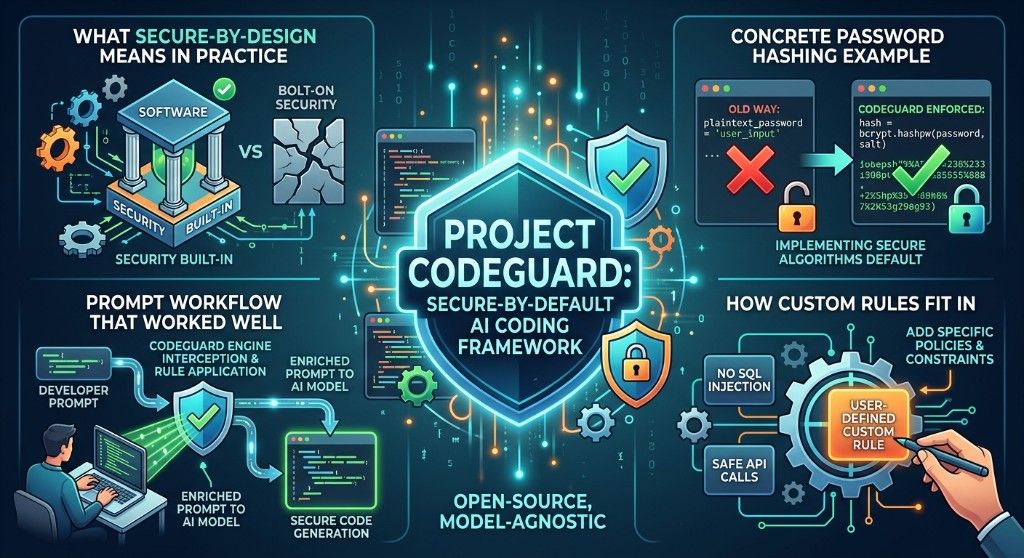
Notes from training on Project CodeGuard — embedding secure-by-design into AI coding agents, from password hashing choices to review workflows and custom rules.
- Authors
-
-

- Name
- Piotr Duda
- https://x.com/duqens
- Technical Strategy Leader at Cisco (Splunk & AppDynamics)
-
Table of Contents
AI coding agents are fast. That speed is useful — and risky. When you ask an agent to “design an authentication system,” the choices in that first proposal (hashing algorithm, secret storage, token format) shape the security posture of everything built on top. Fixing those decisions later is expensive. Catching them at planning time is the point of secure-by-design.
Project CodeGuard is an open-source, model-agnostic framework that embeds secure-by-default rules into AI coding workflows. I recently went through training on it. These are the notes I want to keep: what secure-by-design means in practice, a concrete password hashing example, a prompt workflow that worked well, and how custom rules fit in.
What is secure-by-design?
Secure-by-design means embedding security decisions into the architecture phase, not bolting them on later.
CodeGuard operates at that planning stage. Before a single line of implementation code gets written, its rules shape the AI’s architectural proposals. Ask Claude Code (or Cursor, Copilot, Codex, and similar tools) to design an auth module, and it should not just give you any working solution — it should bias toward a secure one.
That same ruleset also helps during generation and after, in review. One rule can suggest a safe pattern while the agent drafts code, flag unsafe patterns as they appear, and verify the final implementation still follows the policy. Multiple stages, same guidance.
Coverage spans the usual hard areas: cryptography, input validation, authentication, authorization, supply chain, cloud/IaC, APIs, and data protection. The important shift is when those concerns show up — early enough to change the design, not only late enough to open a ticket.
The password hashing scenario
Password hashing is a clean example of why the planning stage matters. A developer — or an unguided agent — might reach for:
- MD5: Fast, widely known, and completely broken for passwords. Rainbow tables crack MD5 hashes in seconds.
- SHA-256: Cryptographically strong for data integrity, but too fast for password hashing. A GPU can brute-force billions of SHA-256 hashes per second.
- bcrypt: Purpose-built for passwords. Intentionally slow, with a configurable work factor that increases computation time as hardware gets faster.
- Argon2: The modern gold standard. Won the Password Hashing Competition in 2015. Memory-hard, which means it is more resistant to GPU and ASIC attacks.
If the agent proposes MD5 or plain SHA-256 for password storage in the initial design, everything downstream inherits that mistake: migrations, login paths, reset flows, and compliance reviews. Secure-by-design means the first proposal already prefers bcrypt or Argon2, and stores secrets in the right place.
A hands-on workflow from training
The training walkthrough that clicked for me was a short sequence of prompts. Design first, implement second, then verify, review, and harden. Roughly:
1. Design under CodeGuard influence
Design the authentication module for this application, covering password storage, token management, and role-based access control.
This is where secure-by-design should show up. You want Argon2/bcrypt, env-based secrets, sensible JWT/session choices, and RBAC sketched before code lands.
2. Implement from that architecture
Implement the authentication module based on your proposed architecture.
Keep the agent honest: implement what was proposed, not a looser alternative.
3. Inspect secrets and JWT key handling
Show me how secrets and JWT keys are managed in this implementation.
4. Verify no hardcoded secrets
Verify that no secrets are hardcoded and all sensitive values use environment variables.
5. Targeted route review
Review the
routers/patients.pyandrouters/admin.pyfiles for security vulnerabilities.
This produced a useful security report — broken access control, missing ownership checks, and similar issues that “works locally” code often hides.
6. Refactor the vulnerable paths
Refactor the vulnerable code to implement proper authorization with ownership checks and role-based guards.
7. Full CodeGuard review
Perform a full CodeGuard security review of this codebase.
That pass was the “nice” moment in training — broader coverage than the two-file review, with findings tied back to rules.
8. Close the loop
List every CodeGuard rule that was violated in the original code and confirm each has been fixed.
Even better. You get an explicit checklist: what was wrong, which rule it hit, and whether the fix actually remediates it. That is how you turn a chat session into something closer to an audit trail.
Custom rules
Out of the box rules cover a lot, but teams have policies that are not universal. Training also covered writing your own rules in CodeGuard’s unified markdown format with YAML frontmatter.
Example prompts:
Write a custom CodeGuard rule that enforces our internal container registry policy using the unified markdown format with YAML frontmatter.
Validate that my custom rule file has the correct structure with YAML frontmatter, description, tags, and section headings.
That second step matters. A broken rule file is silent failure — the agent simply never applies your policy. Validating structure (frontmatter, description, tags, headings) keeps custom guidance loadable and convertible into IDE-specific formats.
This is where CodeGuard gets interesting for real organizations: shared baseline rules from the community, plus local policy (allowed registries, required auth patterns, forbidden crypto) encoded the same way.
Why this fits AI-assisted development
AI agents will happily generate working insecure code unless something steers them. Peer review still matters. So do scanners and compliance checks. CodeGuard is not a replacement for engineering judgment — treat it as defense in depth that moves security left into the prompts and plans you already write.
The workflow that stuck with me is simple:
- Design with security rules in context.
- Implement from that design.
- Verify secrets and authz explicitly.
- Run a full review.
- Map findings to rules and confirm fixes.
- Encode team-specific policy as custom rules.
If you are already using coding agents for greenfield auth, APIs, or admin surfaces, that loop is worth trying once on a small module. The password hashing example alone is a good litmus test: what does your agent propose before CodeGuard, and what does it propose after?
Looking ahead
Secure-by-design used to mean architecture review meetings and checklists. With AI coding tools, a big part of architecture is whatever the agent drafts in the first response. Steering that draft is now a first-class security control.
Project CodeGuard is one way to do that: open rules, agent integrations, and room for custom policy. I am still early with it, but the training made the value concrete — especially the path from design → review → rule-mapped remediation.
More at project-codeguard.org and the GitHub repo.